
What Are AI Agents?
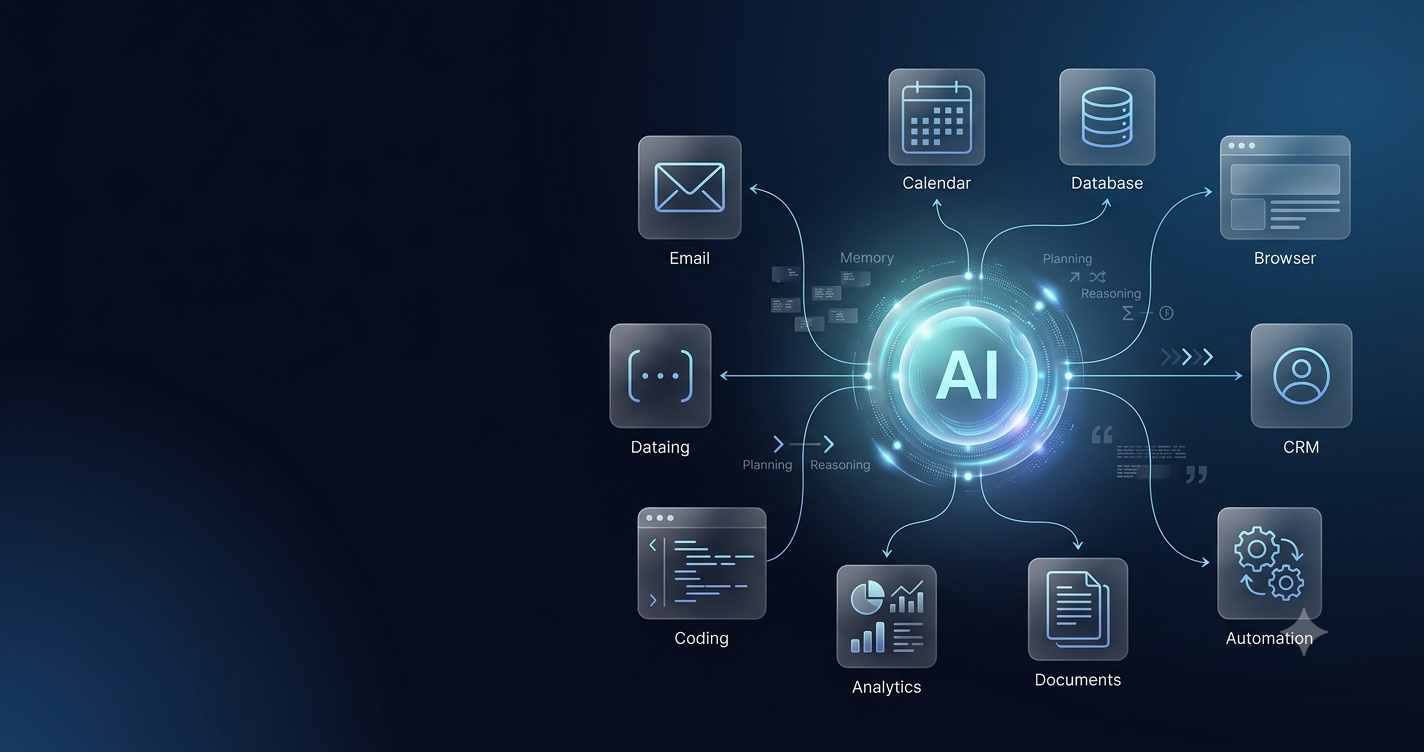
An AI agent is a software system that uses artificial intelligence to pursue a goal and decide what actions are needed to reach that goal. Instead of requiring a person to provide a separate instruction for every small step, an agent can often work through a sequence of tasks on its own.
Imagine asking a normal chatbot to help with a business trip. A chatbot may suggest hotels, write a checklist or explain what documents you need. An AI agent can potentially go further: it may inspect your calendar, search available hotels, compare prices, organize options, prepare a shortlist and request approval before taking the next action.
This difference is important. A language model is mainly responsible for understanding and generating information. An AI agent combines a model with tools, memory, permissions and a workflow so that the system can interact with software and data instead of only producing text.
Simple definition
AI agent = AI model + goal + planning + tools + actions + feedback.
How Do AI Agents Work?
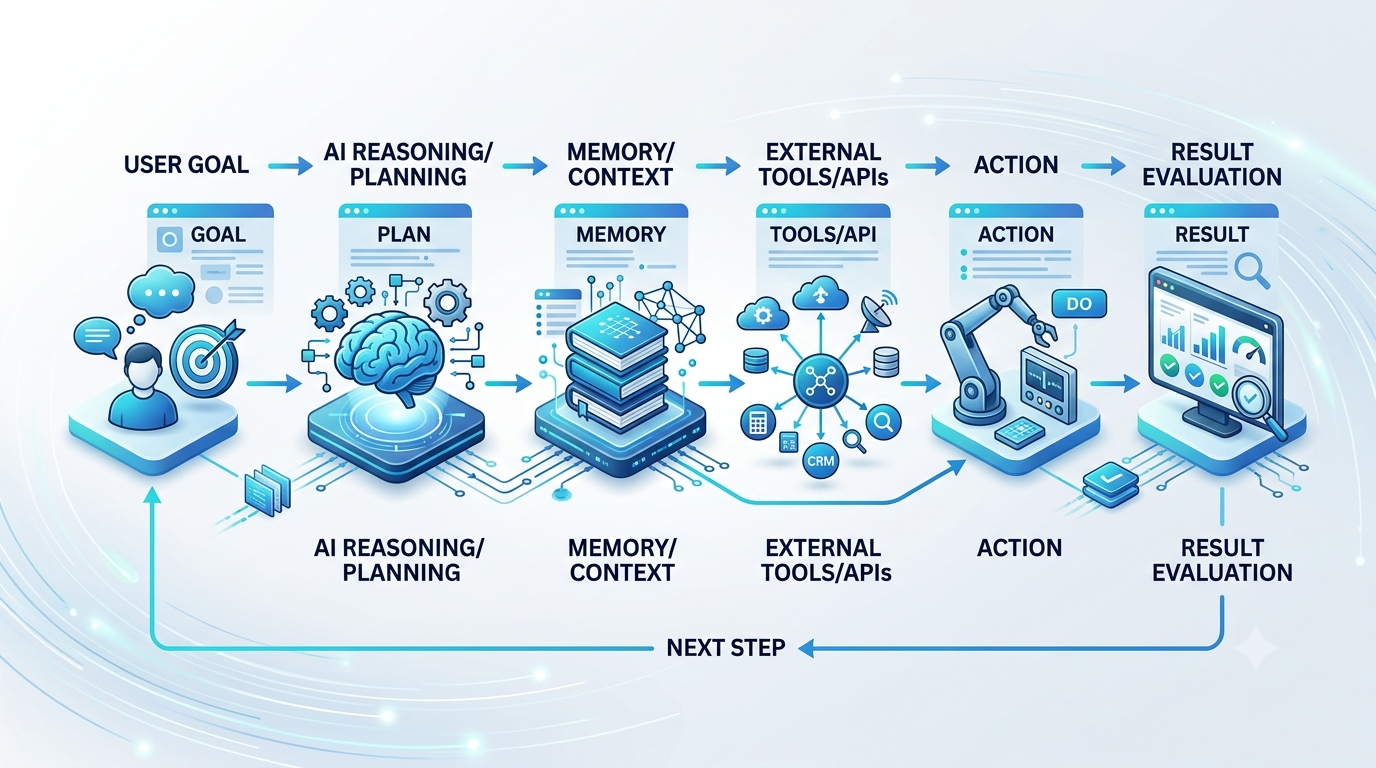
Different AI agent platforms use different architectures, but the basic workflow is usually similar. The system receives a goal, interprets the request, determines a plan, chooses appropriate tools, performs one or more actions and then checks whether the result is good enough.
Goal understanding
Every useful agent starts with a clear objective. A goal may be simple, such as “summarize my unread support tickets,” or complex, such as “prepare a weekly business report using sales, marketing and customer-support data.”
Planning and reasoning
The system breaks a larger objective into smaller steps. For a weekly business report, the agent may collect sales numbers, inspect marketing performance, compare results with the previous week, summarize major changes and finally assemble the information into a report.
Tool selection
An agent becomes more capable when it can access external tools. These may include browsers, APIs, email, calendars, databases, spreadsheets, CRM systems, code execution environments and enterprise software.
Memory and context
Some agents maintain short-term or longer-term memory so they can remember what happened earlier in a task. This can help the system avoid repeating work and make better decisions based on previous steps.
Action and feedback
The system performs the selected action and then checks the result. If an action fails, the agent may choose a different route. If information is incomplete, it may collect more context before continuing.
AI Agents vs Chatbots: What Is the Difference?
Chatbots and AI agents can both use large language models, but their behavior is different. A chatbot usually follows a request-and-response pattern. You ask a question, it generates an answer, and the interaction ends unless you continue the conversation.
An AI agent is designed to continue working toward an outcome. For example, a chatbot can write a customer email. An agent could identify which customers require a response, inspect previous conversations, retrieve account information, prepare a message, ask for approval and update the CRM after the message is sent.
| Feature | Chatbot | AI Agent |
|---|---|---|
| Main purpose | Answer questions and generate content | Work toward a goal and complete tasks |
| Planning | Usually limited | Can plan multiple steps |
| Tool use | Optional | Often central to the workflow |
| Actions | Mostly informational | Can perform controlled actions |
| Autonomy | Low | Varies based on permissions |
AI Agents vs Traditional Automation
Traditional automation works best when a process can be expressed as predictable rules. A workflow may say: if a form is submitted, create a record and send an email. The logic is fixed and easy to test.
Agentic AI is useful when the workflow requires interpretation. Instead of only checking whether a field is present, an agent can read natural language, classify intent, compare options and decide which tool should be used next.
This does not mean AI agents should replace every automation script. The most reliable systems often combine both approaches. Traditional rules handle deterministic steps while AI handles language, prioritization, summarization and other tasks that require contextual interpretation.
Real-World AI Agent Use Cases
Customer support
A customer-support agent can categorize incoming requests, search a knowledge base, summarize the issue, prepare a response and escalate unusual cases to a human. This can reduce repetitive work while keeping people involved in complex or sensitive decisions.
Sales
Sales agents can assist with lead research, CRM updates, meeting preparation, follow-up reminders and personalized outreach drafts. The main value is often reducing administrative work rather than replacing the salesperson.
Marketing
Marketing teams can use agents to research competitors, organize campaign data, prepare reports, repurpose content and summarize customer feedback. Human review is still important for brand voice, factual accuracy and strategic decisions.
Software development
Developer-focused agents can inspect code, explain unfamiliar components, write tests, create documentation, investigate bugs and automate repetitive engineering tasks. This is one of the strongest examples of agentic AI because software development already relies on structured tools and digital workflows.
Finance operations
AI agents can support administrative finance workflows such as invoice classification, reconciliation assistance, report preparation and reminders. High-impact financial decisions should retain appropriate human review and access controls.
Human resources
HR teams may use agents for interview scheduling, onboarding checklists, policy questions and internal knowledge retrieval. Sensitive employment decisions should not be delegated blindly to automated systems.
How Businesses Can Use AI Agents
Large enterprises are not the only organizations that can benefit from AI agents. Small businesses often have repetitive workflows spread across email, spreadsheets, customer systems and calendars. Even a simple agent can reduce the time spent moving information between tools.
A small business might use an AI agent to classify incoming leads, generate follow-up drafts, summarize meetings, organize customer questions, prepare a weekly report or monitor a shared inbox for specific types of requests.
The best place to begin is usually a low-risk process with clear boundaries. Instead of giving an agent full authority over important business systems, start with a workflow where it prepares recommendations and a human approves the final action.
Benefits of AI Agents
Less repetitive work
Many jobs contain repetitive digital tasks that do not require creativity every time. Agents can help with classification, summarization, data transfer, reminders and information retrieval.
Faster execution
Software can process routine information quickly, especially when a task spans several applications or datasets.
Workflow coordination
An AI agent can connect several tools into one workflow. A single request may involve email, a CRM, a spreadsheet and a calendar.
Context-aware automation
Unlike a simple fixed rule, an agent can use context before selecting an action. This can make automation more flexible, although it also creates a need for monitoring and guardrails.
Risks and Limitations of AI Agents
Incorrect reasoning
AI models can misunderstand information, make incorrect assumptions or produce confident but inaccurate outputs. If an agent has permission to act, these mistakes can have real consequences.
Security and permissions
Agents may require access to email, files, customer databases, internal tools or business systems. Access should follow the principle of least privilege: the agent should receive only the permissions required for its specific task.
Privacy
Organizations must understand what information an agent can read, where that information is processed and how sensitive data is protected.
Automation without oversight
More autonomy is not automatically better. High-impact actions involving money, legal obligations, employee decisions or sensitive customer information should generally include clear approval steps and audit logs.
Operational dependency
If a business automates a process without understanding how it works, troubleshooting becomes harder. Teams should maintain documentation and a manual fallback for important workflows.
Why Human-in-the-Loop AI Matters
Human-in-the-loop systems combine automation with human judgment. The AI performs routine work and prepares a recommendation, but a person approves critical actions.
For example, an agent can identify overdue invoices, draft reminder messages and organize them by priority. A finance employee can then review the list before anything is sent. This approach captures much of the productivity benefit without giving the AI unrestricted control.
Basic AI Agent Architecture
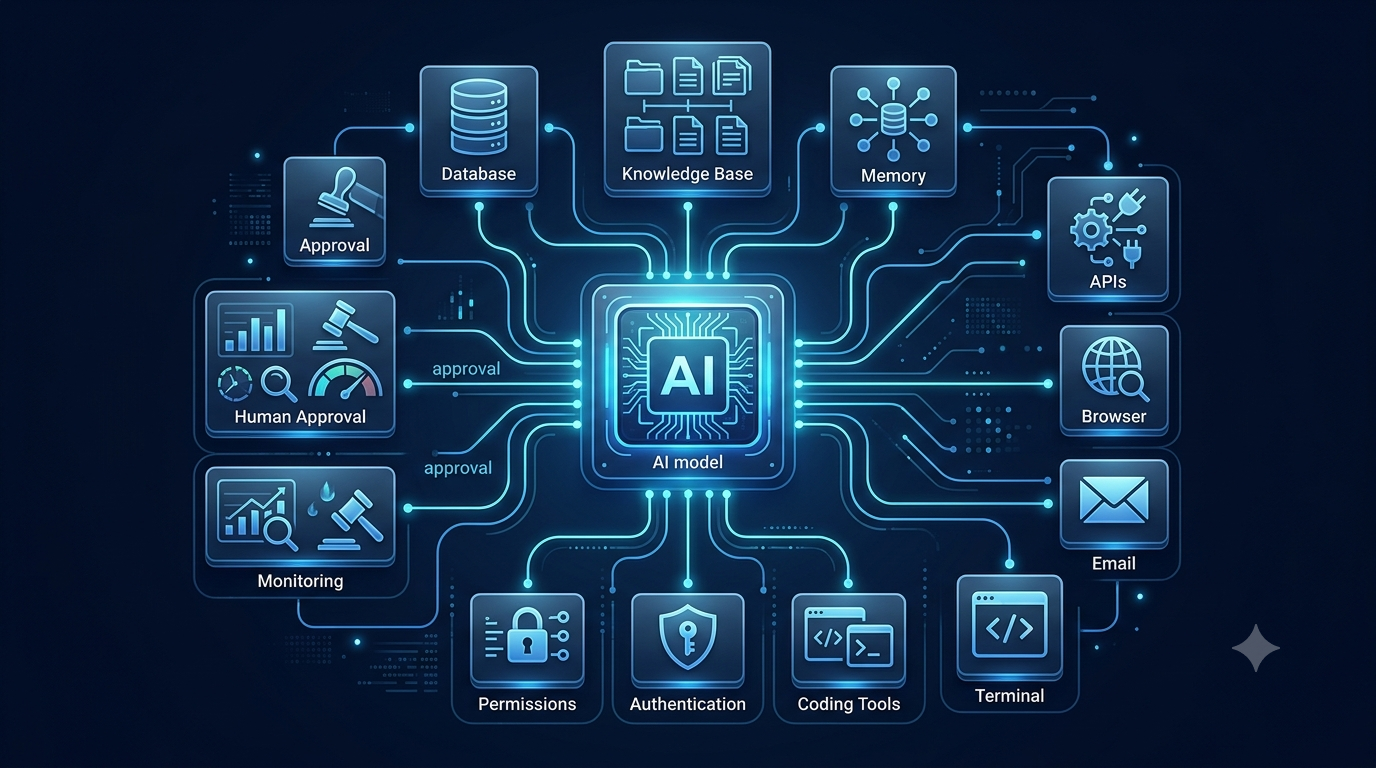
A practical AI agent is usually more than a language model. It may include several components that work together:
- Model: understands language and performs reasoning.
- Instructions: define the agent's role, goals and boundaries.
- Tools: allow interaction with software and data.
- Memory: stores useful context during or across tasks.
- Knowledge sources: provide trusted business or domain information.
- Authentication: controls access to external systems.
- Guardrails: prevent unsafe or unauthorized actions.
- Monitoring: records what happened and helps teams investigate failures.
Single-Agent vs Multi-Agent Systems
Some systems use one agent to handle the complete workflow. Others use several specialized agents that cooperate. A research agent may collect information, an analysis agent may interpret it, and a writing agent may prepare the final output.
Multi-agent systems can be useful when tasks are complex and different roles require different instructions or tools. However, more agents also mean more coordination, more possible failure points and more monitoring. For many practical applications, one well-designed agent is easier to operate than a complicated network of autonomous components.
Skills to Learn for the AI Agent Era
Workflow thinking
Learn to break a business process into steps. If you cannot explain how a workflow works, it is difficult to automate it safely.
Prompt and instruction design
Agents need clear goals, constraints and definitions of success. Writing precise instructions becomes more important as systems gain access to more tools.
API knowledge
Many digital services communicate through APIs. Understanding API basics can help you connect AI systems to real applications.
Python and automation
Python remains useful for data processing, automation and AI integrations. Explore our Python for Data Science and Coding sections for related learning.
Data literacy
AI agents are only as useful as the information available to them. Understanding data quality, structure and permissions is essential.
Critical evaluation
AI output should not be accepted automatically. Strong users know when to verify information and when a human decision is necessary.
A Simple AI Agent Workflow for Beginners
Beginners do not need to start with a fully autonomous system. A safer first project is a workflow that prepares work but keeps the final action under human control.
Receive an incoming support email
Classify the request
Search the knowledge base
Prepare a response draft
Ask a human to approve the reply
Send the approved response and log the result
This workflow teaches the most important concepts: tool use, context, permissions, human approval and monitoring. Once the process is reliable, additional automation can be introduced gradually.
The Future of AI Agents
The long-term direction of AI software is moving from individual commands toward goal-oriented workflows. Instead of manually opening several applications and completing every step yourself, you may increasingly describe the result you want and allow software to coordinate the tools required to produce it.
A future workplace request such as “prepare my weekly operations report” could trigger a system that gathers sales data, retrieves support statistics, checks project status, creates charts, summarizes significant changes and produces a draft for review.
The most successful AI agents will probably not be the systems with the maximum possible autonomy. They will be systems that combine useful automation with clear permissions, good data, monitoring and appropriate human judgment.
Should Beginners Learn AI Agents Now?
Yes, especially if you work in software development, operations, marketing, finance, analytics or business automation. You do not need to become an AI researcher to benefit from the trend.
Start with the fundamentals: how language models work, how APIs connect applications, how permissions should be designed, how automation workflows are tested and where human approval is necessary.
The goal is not to automate everything. The goal is to understand which parts of a workflow are repetitive, which parts require judgment and how AI can support people without making the overall process less reliable.
Frequently Asked Questions About AI Agents
What is an AI agent in simple words?
An AI agent is software that can understand a goal, plan steps, use tools and perform actions to help complete a task.
Are AI agents the same as chatbots?
No. Chatbots primarily respond to prompts, while AI agents can work through multi-step tasks and interact with external tools.
What is agentic AI?
Agentic AI refers to AI systems designed to pursue goals and take actions with some degree of autonomy.
Can AI agents automate a business?
They can automate parts of business workflows, especially repetitive digital tasks, but important decisions still benefit from human oversight.
Are AI agents safe?
Safety depends on permissions, security controls, data access, monitoring and human approval for high-impact actions.
Do AI agents need APIs?
Not always, but APIs are a common way for agents to interact with external software and business systems.
Can small businesses use AI agents?
Yes. Common examples include customer support, lead management, reporting, inbox triage and administrative workflows.
Editorial Note
Xenors publishes practical explainers about artificial intelligence, technology, programming and finance for a global audience. This guide is educational and focuses on how AI agents work, where they can be useful and what limitations users should understand before giving automated systems access to real tools and data.





)
