Cyber Safety • Practical Guide
AI Scams, Deepfakes & Voice Cloning in 2026: How to Spot and Avoid Them
A familiar voice, a convincing video, or a polished message is no longer proof that the person behind it is real. This guide shows you how to verify suspicious requests using simple habits that still work when AI-generated media looks believable.
What Are AI Scams?
An AI scam is not necessarily a completely new kind of fraud. In many cases, artificial intelligence makes an old scam more believable, faster to produce, or easier to personalize. A criminal may use synthetic audio to imitate a relative, generate a convincing profile image, create a fake video, rewrite phishing messages so they sound natural, or automate conversations with many targets at once.
The important lesson is that you should not focus only on whether a photo, voice, or video “looks fake.” Modern synthetic media can be difficult to judge by appearance alone. A safer approach is to verify the identity, channel, context, and requested action independently.
The simple rule
Treat identity and urgency as separate questions. Even if a message appears to come from someone you know, verify the request using a contact method you already trust before sharing information, sending money, approving a payment, or giving access to an account.
Why AI-Powered Scams Can Be So Convincing
Scams often succeed because they target normal human behavior. We respond quickly when we think a family member is in danger. We trust familiar voices. We tend to obey messages that appear to come from a manager, bank, government agency, delivery company, or support team. AI can strengthen those signals by making the communication feel more personal.
The U.S. Federal Trade Commission has warned that scammers can use voice cloning to imitate a loved one during an emergency scam. The FTC recommends independently contacting the person using a phone number you already know rather than trusting the incoming call. The FBI has also warned about malicious campaigns involving AI-generated voice messages and impersonation, emphasizing independent verification of the sender and contact information.
Voice Cloning Scams: When the Caller Sounds Real
Voice cloning tools can create synthetic speech that resembles a real person. A scammer may obtain public audio from social media, a video, a podcast, or another recording and use it to make an impersonation attempt more persuasive.
A classic example is the family-emergency scam. The caller sounds like a child, parent, grandchild, or friend and claims to need money immediately. The story may involve an accident, arrest, medical emergency, lost phone, travel problem, or another crisis designed to prevent you from slowing down.
Do not try to win a “voice detection” contest
People often look for robotic pauses, strange pronunciation, or audio artifacts. Those clues can sometimes help, but they are not a dependable security system. High-quality generated audio may sound natural, and ordinary phone compression can also make real voices sound unusual.
Better response
- End or pause the suspicious conversation.
- Call the person using a number already saved in your contacts.
- If they cannot be reached, verify through another trusted relative, colleague, or known channel.
- Do not send money until the situation is independently confirmed.
Deepfake Video Scams: Why Visual Inspection Is Not Enough
Deepfake video refers broadly to manipulated or synthetic video that makes a person appear to say or do something they did not actually say or do. Some fakes are obvious. Others are not.
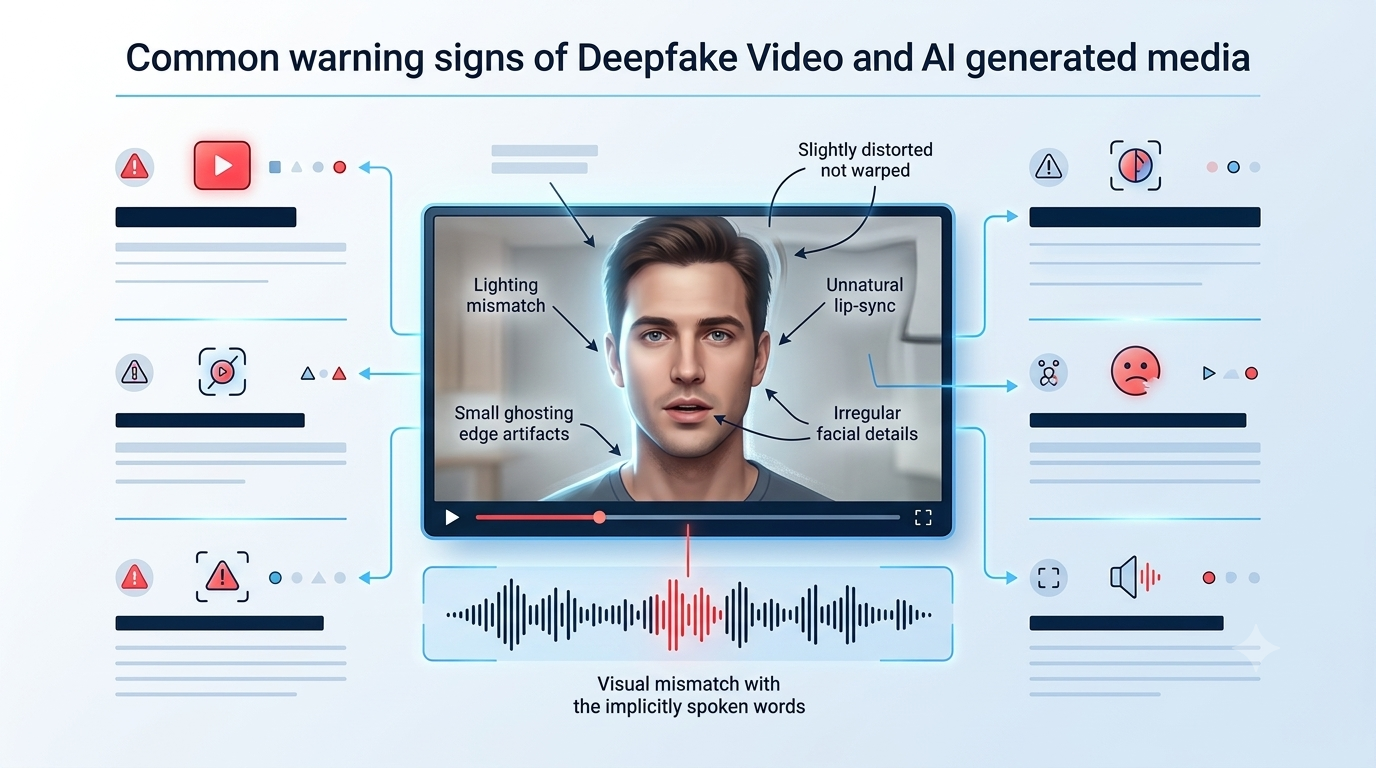
The FBI has advised people to look for subtle visual or audio irregularities in suspicious media, but it also notes that AI-generated content has advanced to the point where identifying it can be difficult. That means visual clues should be treated as warning signals, not proof.
Possible clues to inspect
You may notice unnatural facial movement, inconsistent shadows, odd accessories, unusual blinking, mismatched lip movement, strange body motion, distorted hands, audio lag, or details that change between frames. However, the absence of those clues does not prove the video is genuine.
Check the source before the pixels
Ask where the video came from. Is it posted by the person’s known account? Is the account newly created? Can the claim be confirmed through an official website, another trusted channel, or reputable reporting? A convincing video shared from an unknown account is still an unknown source.
AI Phishing and Impersonation Messages
Older phishing emails were often easy to notice because they contained obvious grammar mistakes or generic wording. AI can help criminals generate polished messages, imitate a professional tone, translate text, and adapt messages for different audiences.
This means “the grammar looks good” is no longer a meaningful safety check. Focus instead on the behavior the message is trying to trigger.
| Message type | Possible scam behavior | Safer response |
|---|---|---|
| Bank or payment alert | Asks you to click a link, reveal a code, or move money | Open the official app or type the known website address yourself |
| Boss or executive request | Urgent confidential payment or account change | Verify using normal company approval procedures |
| Family emergency | Immediate money request with emotional pressure | Call the person or another family member independently |
| Tech support | Requests remote access, passwords, codes, or payment | Contact the company through its official support channel |
| Delivery or account problem | Link to “fix” an issue or pay a small fee | Use the official website or app instead of the supplied link |
10 Red Flags That Matter More Than Whether the Content Looks AI-Generated
- Unexpected urgency: the sender tries to prevent you from taking time to think.
- Secrecy: you are told not to discuss the request with anyone else.
- New contact details: a familiar person suddenly uses a new number, email, or account.
- Unusual payment method: gift cards, crypto, wire transfers, or unfamiliar payment instructions.
- Requests for verification codes: one-time codes should not be shared with unexpected callers.
- Pressure to bypass normal procedures: especially in businesses, payroll, procurement, or finance.
- Unexpected account recovery: someone claims they can recover lost money for a fee.
- Unsolicited remote access: a caller wants control of your device.
- Link mismatch: the message claims to represent a known organization but sends you to an unfamiliar domain.
- Refusal to verify another way: the person resists a callback, known-channel confirmation, or normal approval process.
Important
None of these signs proves fraud on its own. The goal is to recognize when a request deserves independent verification before you act.
The 60-Second Verification Method
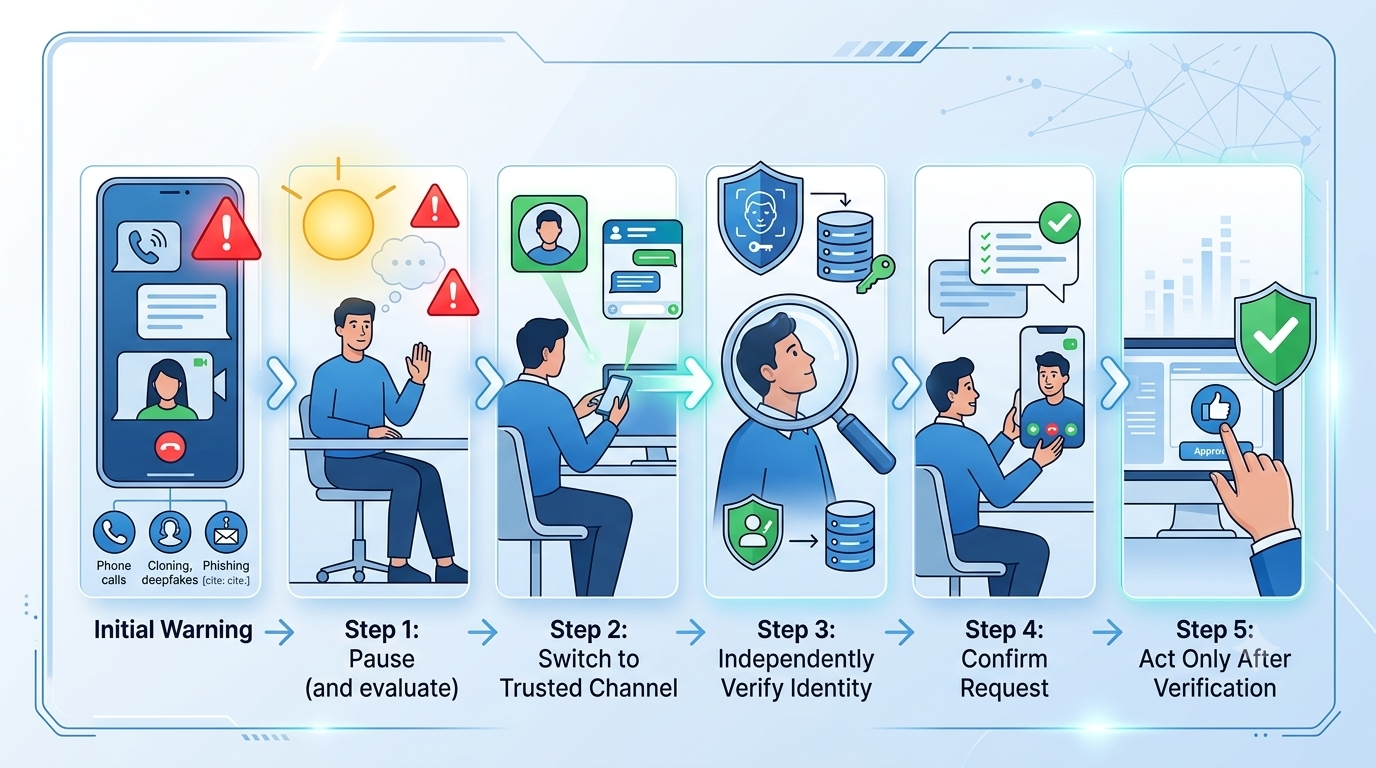
The strongest defense against AI impersonation is often procedural rather than technical. You do not need to identify exactly which model produced a suspicious message. You need a reliable way to verify the request.
Step 1: Pause
Do not let urgency become the security decision. A legitimate person, bank, colleague, or support team can usually tolerate a short verification delay.
Step 2: Switch channels
If the suspicious request came through a phone call, verify through a known messaging account or another known number. If it came through email, call the organization using contact information from its official website or app.
Step 3: Verify identity independently
Do not use the phone number, link, or contact details included in the suspicious message. Find the contact information yourself from a trusted source.
Step 4: Verify the requested action
Even if the identity appears genuine, ask whether the request itself makes sense. Would this person normally ask for a gift card? Would your manager normally skip the payment approval process? Would your bank ask you to move funds because of an unexpected call?
Step 5: Use a second person for high-risk actions
When money, credentials, payroll, account access, or sensitive information is involved, a second-person check can stop mistakes that look convincing in the moment.
Quick scam-risk checklist
Tick every condition that applies to the message or call you received.
How Businesses Can Reduce AI Impersonation Risk
Companies should assume that voice, video, email, and messaging accounts can all be impersonated. Security policies should therefore protect the transaction rather than rely on recognizing the person.
For high-value payments, payroll changes, vendor bank-account changes, credential resets, remote access, and confidential data requests, establish an approval process that cannot be bypassed by a single phone call or message.
Use known-channel verification
If a supplier emails new bank details, verify the change using the supplier’s previously known contact information. Do not verify through the phone number included in the same suspicious email.
Require dual approval for sensitive actions
A second approver is especially useful for unusual payments, payroll modifications, password resets, and changes to financial information.
Protect public information
Organizations should understand how much audio, video, organizational detail, and employee information is publicly available. Public content can help attackers make social engineering more convincing even when it is not sensitive by itself.
Train people with scenarios, not slogans
“Be careful online” is too vague. Training should show employees what to do when a familiar voice requests a transfer, when a manager uses a new number, when a vendor changes payment details, or when support staff ask for a one-time code.
Can Deepfake Detection Tools Solve the Problem?
Automated deepfake detection can be useful in some environments, but consumers should not depend on a single detector as the final authority. Synthetic media tools and detection methods continue to evolve, and real media can also be compressed, edited, filtered, or reposted in ways that affect automated analysis.
The practical goal is not to prove whether every suspicious image is AI-generated. If a video asks you to send money, reveal a password, approve a transaction, or trust a new contact channel, verify the request regardless of whether a detector labels the media as synthetic.
What About Watermarks and AI Labels?
Labels, provenance systems, metadata, and watermarks can improve transparency when they are present and preserved. But their absence does not prove that content is authentic, and their presence should not replace independent verification when the stakes are high.
Content can be copied, cropped, recompressed, screenshotted, or moved between platforms. That is why user behavior remains an important layer of protection.
What to Do If You Think You Responded to a Scam
Act quickly, but do not panic. The right steps depend on what information or money was exposed.
- Contact the financial institution or payment service immediately if money was sent or account information was shared.
- Change affected passwords and avoid reusing the compromised password elsewhere.
- Enable multi-factor authentication where available.
- Review account activity for unauthorized logins, transactions, forwarding rules, or profile changes.
- Tell relevant contacts if your account may be used to impersonate you.
- Report the incident through the appropriate official fraud or cybercrime reporting channel in your country.
In the United States, the FTC directs consumers to ReportFraud.ftc.gov, and the FBI directs cybercrime reports to IC3.gov. Readers in other countries should use their national cybercrime or consumer-protection authority.
How Families Can Prepare Before an Emergency Scam Happens
A family verification plan can be very simple. Agree that unexpected financial requests will always be confirmed through a second channel. You can also establish a private family question or phrase that is not posted publicly.
The goal is not to create a complicated secret system. It is to create permission to slow down. If everyone knows that emergency requests will be independently checked, a scammer has less ability to use urgency as pressure.
How to Think About AI Scam Safety in 2026
AI changes the cost and quality of impersonation, but it does not change the basic security principle: trust should come from verification, not appearance.
A realistic voice is not authentication. A high-resolution video is not authentication. A professional email is not authentication. A profile photo is not authentication. Even a message from a known account can be dangerous if that account has been compromised.
Good security habits are deliberately boring. Call back. Open the official app yourself. Use a known website. Ask a second person. Follow the normal approval process. Give yourself time to think. These steps remain effective even when the media itself becomes harder to judge.
Frequently Asked Questions
How can I tell if a voice call is AI-generated?
Do not rely on the voice alone. End the call and contact the person through a phone number or channel you already trust. Verify the request independently before sharing information or sending money.
What is the safest way to verify an emergency money request?
Pause and contact the person directly through a known number. If you cannot reach them, confirm with another trusted person. Avoid using contact details supplied by the suspicious caller or message.
Can deepfake videos look completely real?
Yes. Visual imperfections can be clues, but high-quality synthetic media may be difficult to identify by appearance alone. Source and identity verification are more reliable than visual inspection by itself.
Can AI write phishing emails without spelling mistakes?
Yes. Good grammar is not evidence that a message is legitimate. Verify the sender, link, domain, request, and normal process instead.
Should I trust a deepfake detector?
Treat detection tools as one signal, not final proof. For high-risk requests, independently verify the person and action even if a detector says the media appears genuine.
Sources and Further Reading
Primary references used for this guide
- U.S. Federal Trade Commission — AI voice-cloning family emergency scam guidance.
- Federal Bureau of Investigation — AI-generated voice impersonation warning.
- Federal Bureau of Investigation — updated impersonation campaign guidance.
Editorial note: This article is educational and focuses on practical verification habits. Scam techniques evolve, so readers should consult official consumer-protection and cybercrime authorities for current reporting and recovery procedures in their country.


)