Quick answer
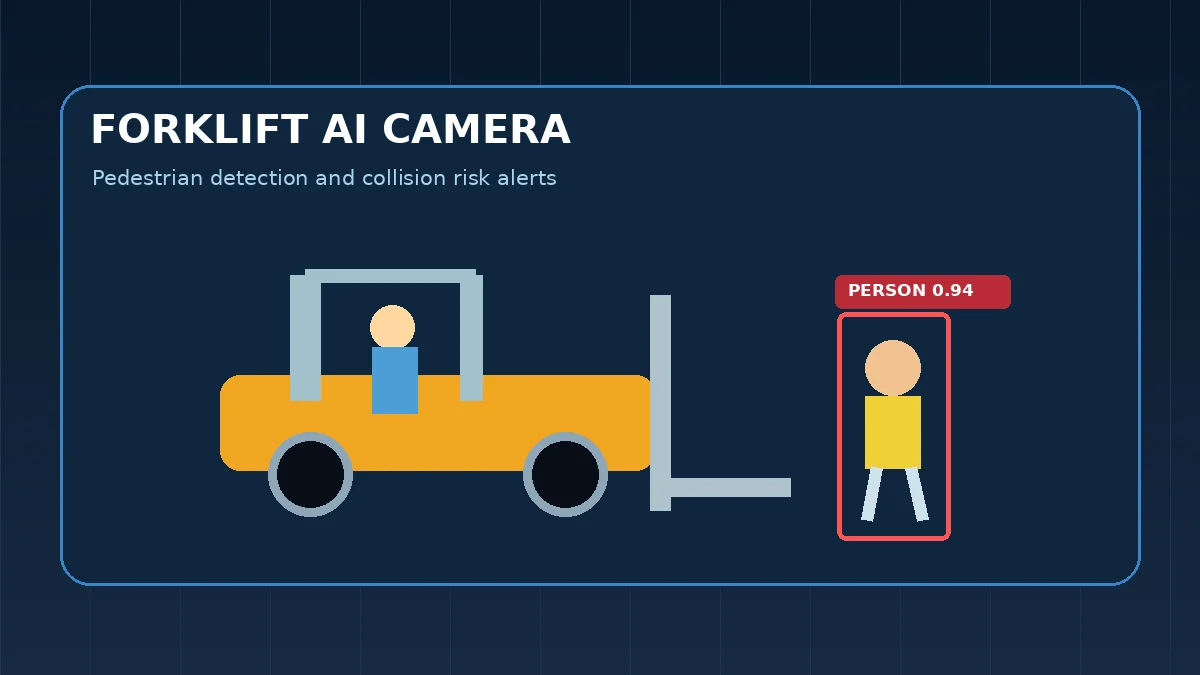
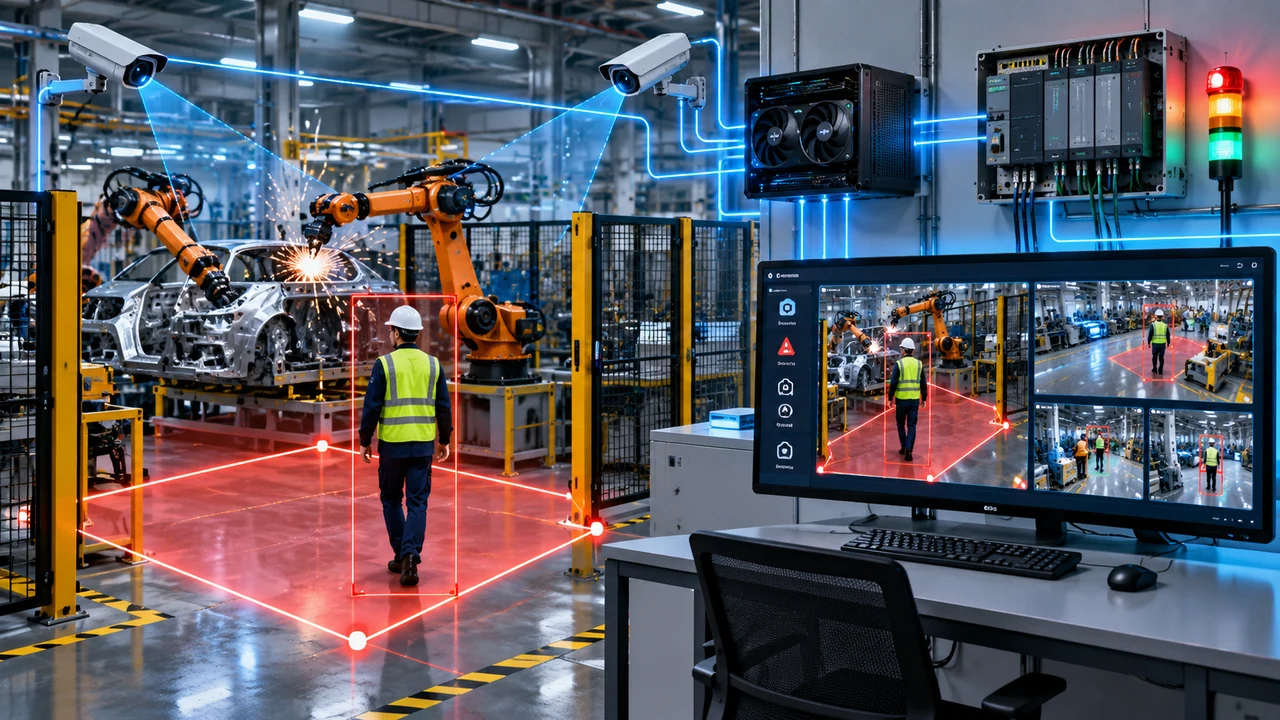
A pedestrian detection AI system uses a pedestrian detection AI camera (or several) and computer-vision software to find people inside configured zones, confirm the detection, log evidence and signal a PLC or alarm. A human detection AI camera setup such as the HESHAM HIS-AI-002 adds up to five camera channels, ROI and ignore zones, PLC-controlled dynamic zones, snapshots, event video and health monitoring. It works as an additional monitoring layer, not as a replacement for a certified safety camera, light curtain, safety laser scanner or safety PLC.
See the Pedestrian Detection AI Camera System in Action
A short demo of the HESHAM human detection AI camera system. Camera-based detection is used here for factory safety and automation workflows.
AI Camera, GPU, PLC and Monitoring in One System
The supplied platform can be engineered as a complete panel solution with AI processing computer, NVIDIA RTX 3060 GPU, a 25-inch live monitor, camera interfaces, PLC communication and commissioned human-detection software.
View HESHAM Product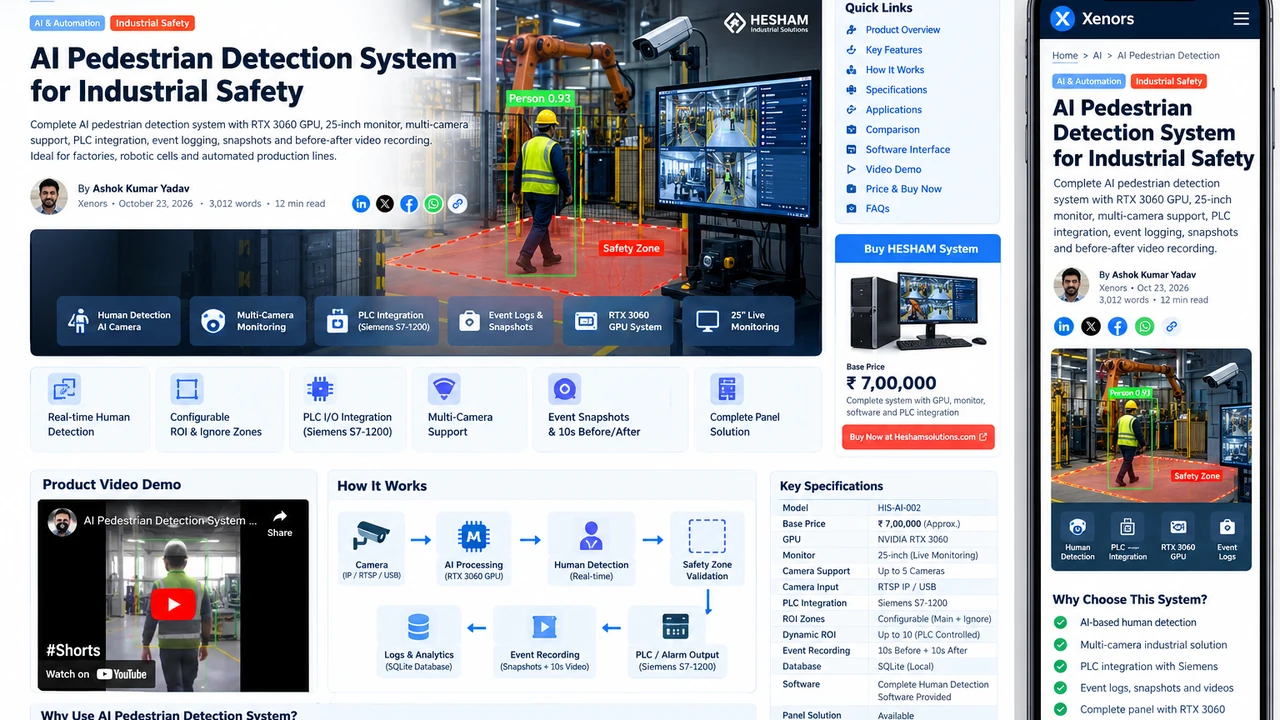
Factories with robots, welding cells and automated lines share one hard problem: knowing when a person has stepped into a hazardous area. An ordinary CCTV safety camera records what happened, but it does not decide whether someone is inside a danger zone.
A pedestrian detection AI system analyzes live video continuously, recognizes a person, checks whether that person is inside a configured zone and can pass a confirmed event to an alarm or PLC. The pedestrian detection AI camera is the sensor; the AI software, zone logic and PLC interface turn its video into an automation signal.
This guide explains how a human detection AI camera differs from ordinary CCTV, what the HESHAM HIS-AI-002 system includes, where such a system fits in a machine-safety design, and what to check before you buy.
For projects that need a complete commissioned solution rather than standalone software, the system can be supplied as a panel with an industrial computer, NVIDIA RTX 3060 GPU, a 25-inch live-monitoring display, camera connectivity, PLC I/O integration and configured human detection software.
Buy / Request a Quote:
HESHAM Pedestrian Detection AI System
Pedestrian Detection AI Camera vs Pedestrian Detection AI System
The two terms are often used as if they mean the same thing. In practice the camera is only one part of the system.
| Part | Role in the pedestrian detection AI system |
|---|---|
| Camera (RTSP IP or USB) | Captures the live video of the cell, line or restricted area. |
| Human detection software | Finds people in each frame and works out where they stand on the floor. |
| GPU computer (RTX 3060 in this configuration) | Runs the AI inference fast enough for several camera streams. |
| ROI, ignore zones and timer | Decide whether a detection counts and whether it lasts long enough to confirm. |
| PLC / alarm interface | Sends Human Detected, System OK, System Fault and heartbeat signals to the control system. |
| Evidence and logs | Stores snapshots, event video and searchable event history. |
When you compare products, ask whether you are buying a camera with built-in analytics or a complete system. The first gives you an image and a detection; the second also covers zones, PLC signals, evidence and monitoring.
What Is a Pedestrian Detection AI System?
A pedestrian detection AI system is a computer-vision safety solution that analyzes live video and identifies people within monitored areas.
Traditional CCTV simply displays or records video. A human detection camera combined with AI software actively evaluates the scene and determines whether a person is present within a configured detection area.
A typical industrial workflow is:
Camera → AI Processing → Human Detection → Safety-Zone Validation → Event Confirmation → PLC / Alarm Output → Evidence Recording
This distinction is important.
A normal camera asks an operator to notice danger.
An AI camera continuously watches the scene and can generate an automated detection event when defined conditions are met.
For industrial applications, this means the camera and software can monitor areas such as:
- robotic welding cells
- assembly lines
- material-handling zones
- automated production lines
- machine loading areas
- restricted zones
- robot work cells
- warehouse intersections
- transfer lines
- dangerous machine-access areas
The objective is not simply to detect movement. It is to identify a human and then determine whether that human is located inside an area where detection matters.
How a Pedestrian Detection AI Camera Works
A pedestrian detection AI camera system receives a live video stream from one or more industrial or IP cameras.
Each video frame is passed to an artificial-intelligence model trained to recognize the human form.
When a person is detected, the system calculates the detection position relative to the configured area.
For industrial floor zones, HESHAM’s software can evaluate the bottom-center or feet position of the detected person. This is useful because the person’s feet generally correspond more closely to their actual location on the factory floor than the center of the entire bounding box.
The logic then becomes:
- Capture live camera frame.
- Run human-detection inference.
- Identify a person.
- Determine the person’s floor position.
- Check whether that position is inside the active ROI.
- Check whether it falls inside an ignore zone.
- Evaluate Dynamic ROI state.
- Apply confirmation timing.
- Generate a confirmed event.
- Activate the configured output or PLC signal.
- Save evidence and event information.
This makes the system significantly more useful than a basic motion detector.
Movement from machinery, shadows, welding equipment or other objects does not automatically have to be treated as a pedestrian event.
Human Detection AI Camera vs Standard CCTV Camera
A standard CCTV camera and a human detection AI camera may use similar video hardware, but their purpose is different.
| Feature | Standard CCTV | Human Detection AI Camera System |
|---|---|---|
| Live video | Yes | Yes |
| Video recording | Usually | Yes |
| Detect human automatically | Usually no | Yes |
| Configurable safety ROI | Limited | Yes |
| Ignore zones | Limited | Yes |
| Dynamic PLC-controlled zones | No | Supported |
| Automated event trigger | Limited | Yes |
| PLC integration | Normally no | Yes |
| Human-specific event logs | No | Yes |
| Detection snapshots | Recording dependent | Supported |
| AI health monitoring | No | Yes |
A standard camera improves visibility.
A human detection AI system adds decision-making logic to that visibility.
That difference matters in industrial safety because operators cannot continuously watch every camera feed across multiple production areas.
AI Safety Camera vs CCTV Safety Camera vs Certified Safety Devices
The phrase safety camera covers very different things, so it helps to separate them before choosing a solution.
| Type | What it does | Typical role |
|---|---|---|
| CCTV safety camera | Shows and records video. A person has to watch it. | General visibility and incident review |
| AI safety camera (this system) | Detects people in configured zones, logs evidence and signals a PLC or alarm. | Extra monitoring layer, alerting and evidence |
| Safety light curtain, safety laser scanner or certified safety vision system | Purpose-built safety devices evaluated against machine-safety standards. | Safety functions that must stop or limit a machine |
Standards such as ISO 13849-1 and IEC 62061 describe how safety-related control functions are designed, and IEC 61496 covers electro-sensitive protective equipment such as light curtains and laser scanners. An AI camera that is not certified for a safety function should not be the only thing that stops a hazardous machine.
The practical approach is to use the AI camera for what it does well: recognizing people, adding zone logic, giving the PLC an extra signal and keeping evidence. The risk assessment for the machine then decides which certified devices are also required.
Complete Industrial Human Detection Software
The core of the solution is the human detection software.
HESHAM’s system is designed as a centralized Windows-based monitoring application rather than only a simple detection script.
The software includes multiple operational modules so engineers, maintenance teams and authorized operators can configure and monitor the complete system.
AI Monitor
The AI Monitor provides live camera feeds with detection overlays and operational status.
Depending on configuration, operators can view:
- live video
- person bounding boxes
- detection status
- current FPS
- camera condition
- AI-ready state
- active alarm condition
This becomes the primary live safety-monitoring interface.
CCTV Live View
AI overlays are useful during operation, but troubleshooting sometimes requires a clean camera view.
The CCTV page displays camera streams without AI overlays.
This allows an engineer to quickly determine whether a problem originates from:
- the camera
- network communication
- RTSP streaming
- ROI configuration
- AI processing
- detection logic
Separating clean CCTV viewing from AI monitoring makes commissioning and maintenance easier.
Multi-Camera Human Detection Software
Industrial facilities rarely have only one critical viewing angle.
The supplied HESHAM configuration supports up to five camera channels, each independently configurable.
A camera can be configured for:
- RTSP IP-camera stream
- supported USB-camera input
- source URL
- camera name
- FPS target
- AI processing stream
- monitoring parameters
Multiple cameras can cover different sides of a robotic cell, production line or restricted area.
For larger projects, the architecture can be engineered according to site requirements.
A centralized multi-camera pedestrian detection system gives the operator one interface instead of several disconnected CCTV screens.
RTX 3060 GPU AI Processing
Real-time industrial computer vision requires consistent processing performance.
The proposed complete system can use an NVIDIA RTX 3060 GPU for accelerated AI inference.
GPU acceleration is particularly useful when several camera streams must be analyzed simultaneously.
A typical architecture can therefore include:
- industrial Windows computer
- NVIDIA RTX 3060 GPU
- system RAM and local storage sized for application requirements
- Gigabit network connectivity
- industrial camera network
- 25-inch monitoring display
- PLC communication
- event-storage drive
- AI human-detection software
The software is designed to prefer GPU processing while retaining CPU fallback capability where supported.
Actual camera count, frame rate, AI image size and processing performance should always be commissioned according to the final hardware and site conditions.
25-Inch Live Monitoring Display
A complete installation can include a 25-inch monitor for centralized live monitoring.
This provides operators and maintenance personnel with a clear view of:
- AI Monitor
- multiple camera feeds
- CCTV view
- system alarms
- camera faults
- event history
- hardware health
- ROI configuration
- PLC status
For machine rooms, control rooms or production-line monitoring stations, a dedicated display provides much better visibility than relying on a small laptop screen.
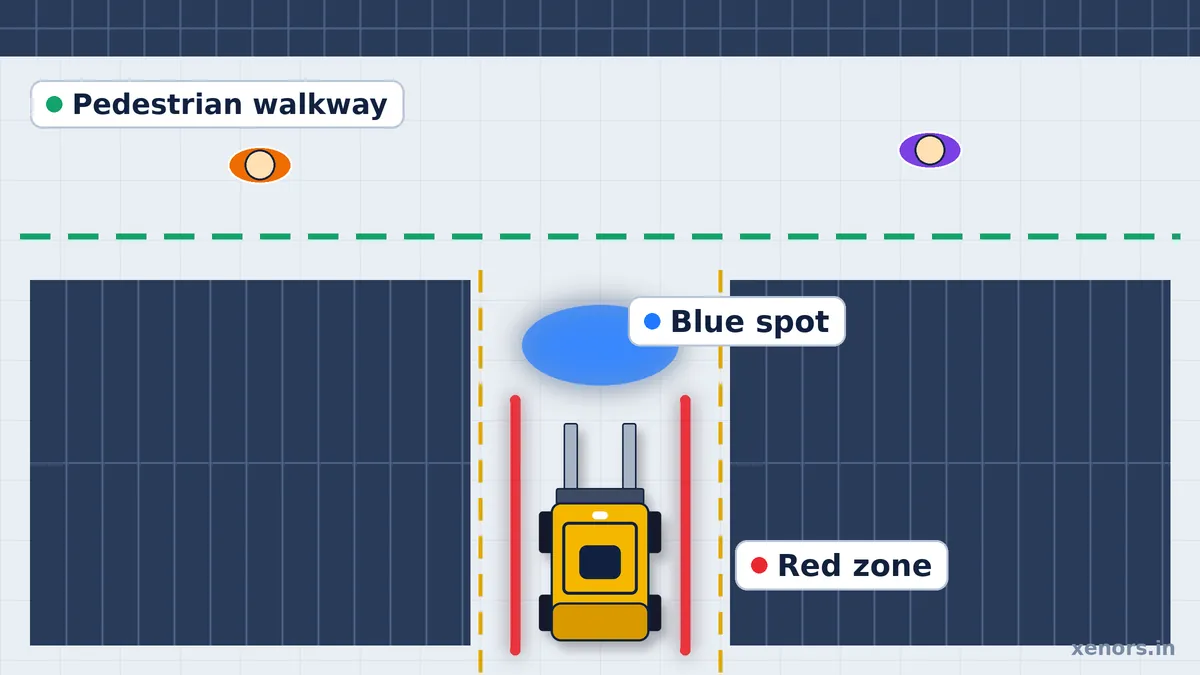
Main ROI: Detect People Only Where It Matters
One of the most important parts of a good pedestrian detection AI system is the ability to define exactly where a detection should count.
Suppose a camera sees both:
- a robotic welding cell, and
- a safe pedestrian walkway outside the cell.
Without ROI logic, every visible person could create an unnecessary alarm.
HESHAM’s software allows a Main ROI polygon to be configured independently for each camera.
Human detections outside this polygon can be excluded from the safety decision.
This makes the AI camera more practical for real industrial scenes.
AI Ignore Zones
Even inside the main detection area, some regions may need to be excluded.
For example:
- reflections through windows
- operator screens
- safe platforms
- neighboring walkways
- inaccessible sections
- visual areas that should not participate in the safety decision
The system therefore supports AI Ignore Zones.
The supplied configuration supports up to five ignore polygons per camera.
This provides much finer control than simply drawing one large rectangular detection zone.
PLC-Controlled Dynamic ROI
Industrial areas are not always static.
A zone that is dangerous while a robot is operating may be safe during maintenance.
Another zone may need monitoring only when a fixture, conveyor or machine is in a particular state.
This is where Dynamic ROI becomes useful.
A Dynamic ROI polygon can be activated or deactivated according to a PLC signal.
For example:
Robot Running = Dynamic ROI ON
When the relevant PLC bit becomes active, that zone participates in human-detection logic.
When the condition is inactive, the same zone can remain reserved but excluded from active detection.
The supplied five-camera configuration supports up to 10 globally numbered Dynamic ROI polygons.
This creates a direct connection between machine state and AI-camera monitoring.
Siemens S7-1200 PLC Human Detection Integration
A major difference between a general security AI camera and an industrial safety-monitoring system is PLC integration.
HESHAM’s platform supports configurable communication with Siemens S7-1200 PLC systems.
Typical signals can include:
- Human Detected
- System Fault
- System OK
- Python / Software Heartbeat
- Dynamic ROI inputs
The final input/output mapping can be commissioned according to the customer’s machine architecture.
A possible architecture is:
Industrial Cameras → RTX AI Computer → HESHAM Human Detection Software → Siemens PLC → Client PLC / Robot Controller → Alarm / Process Response
The exact machine response should be defined by the approved automation and safety architecture.
AI vision should be treated as an additional monitoring and automation layer rather than a replacement for certified emergency-stop systems, safety PLCs, interlocks, guarding or statutory machine-safety requirements.
PLC Input Control
PLC inputs can be used to control software conditions.
For example:
- enable Zone 1
- enable Zone 2
- machine running
- robot cycle active
- maintenance mode
- fixture active
- process stage active
These inputs can dynamically determine which parts of the camera image are considered dangerous.
This is particularly useful in robotic and automated production lines where the hazard area changes during the production cycle.
PLC Output Control
The system can also provide output signals to the control architecture.
Typical outputs include:
Human Detected
Indicates that a confirmed person has been detected under valid safety-zone conditions.
System Fault
Indicates an AI-system, camera, hardware or configured operational fault.
System OK
Provides status indicating that required monitoring conditions are healthy.
Heartbeat
A cyclic software heartbeat allows the PLC to determine whether the monitoring application is still communicating.
This is much more suitable for automation integration than relying only on a visual alert on a monitor.
Detection Confirmation Timer
Industrial AI must balance fast detection with unnecessary triggering.
A single-frame detection should not always trigger the entire process.
The software therefore provides a configurable confirmation time.
For example:
If confirmation time = 3 seconds, a person must remain continuously valid within the monitored safety area for the configured duration before the event becomes confirmed.
Short or unstable detections can therefore be filtered.
This can help reduce unwanted triggers while maintaining site-specific safety logic.
Final confirmation timing must be commissioned according to the application’s risk assessment and required response behavior.
Event Snapshot Recording
When a human-detection event occurs, the system can automatically create a snapshot.
The snapshot provides visual evidence showing what the AI detected.
Event information can include:
- date
- time
- camera
- detection type
- image
- event status
This makes incident review much faster than searching through hours of standard CCTV recordings.
10-Second Before and After Event Video
For useful incident investigation, a single image is sometimes not enough.
A practical deployment can retain an event clip containing approximately 10 seconds before and 10 seconds after a confirmed detection, depending on the commissioned recording configuration.
The pre-event footage helps answer:
- Where did the pedestrian come from?
- Was the machine already operating?
- Was the pedestrian already inside the zone?
- Was there unusual behavior before the alert?
Post-event footage helps show:
- whether the person exited
- whether the process responded
- whether the alarm remained active
- how operators reacted
This transforms the pedestrian detection system from only an alarm generator into a useful safety-review platform.
Event Logs and Searchable Detection History
Each confirmed detection can be added to an event log.
Instead of relying on memory or manually reviewing cameras, authorized users can examine historical detections.
Typical event information can include:
- timestamp
- camera name
- detection image
- event video
- detection status
- alarm status
This can help safety and engineering teams identify recurring risk areas.
For example, if Camera 3 records repeated pedestrian-entry events near the same machine, the problem may indicate a workflow, training or physical-layout issue that deserves further investigation.
Human Detection Matrix and Analytics
Event information can also be summarized into a detection matrix or operational dashboard.
Depending on the commissioned software version, this can be used to evaluate patterns such as:
- detections by camera
- detections by date
- detections by shift
- recurring hazardous zones
- camera availability
- system alarm history
The goal is not simply to generate alarms.
The longer-term value comes from converting detection events into information that can support better safety decisions.
Camera Health Monitoring
A safety-monitoring camera is useful only when it is actually online.
Each configured camera can report operational states such as:
- ONLINE
- CONNECTING
- DOWN / FAULT
- current FPS
- AI Ready
- Human Detected
This makes camera failures visible instead of allowing a disconnected camera to remain unnoticed.
Automatic Camera Recovery
Industrial network cameras can temporarily disconnect because of:
- network interruption
- camera restart
- power fluctuations
- RTSP timeout
- switch problems
- temporary communication failure
A production-oriented system should attempt recovery without requiring an operator to manually refresh the interface every time.
The camera-monitoring architecture can therefore include automatic reconnect and health-check logic.
Complete System Health Dashboard
The software can monitor more than camera availability.
The health dashboard can display:
- CPU usage
- RAM usage
- GPU status
- disk utilization
- system temperature
- camera health
- AI processing state
This allows maintenance engineers to identify performance degradation before it results in a complete monitoring failure.
Administration, Storage and Reliability Features
A system that runs around the clock also needs sensible administration. The HESHAM platform includes:
- Storage management: when disk usage reaches a set limit, the software can switch storage location or remove the oldest HESHAM AI event files while keeping recent evidence.
- Local SQLite database: configuration, logs and event data stay on the supplied industrial computer, with no mandatory cloud dependency for normal operation.
- Role-based users: operator and administrator roles, with administrators able to create users and reset passwords.
- AUTO, manual and bypass modes: bypass is password-protected and intended only for authorized commissioning or maintenance staff.
- Windows service startup: the monitoring backend can start automatically when the industrial computer powers on.
- Client branding: the company name and logo can be configured in the interface.
Complete Panel Solution
HESHAM can supply the pedestrian detection AI system as a complete industrial panel solution, rather than requiring the customer to assemble individual software and hardware components.
A project can include:
- industrial AI computer
- NVIDIA RTX 3060 GPU
- configured Windows environment
- HESHAM Human Detection Software
- local database
- camera connectivity
- Gigabit networking
- PLC interface
- industrial control components
- storage
- 25-inch live-monitoring display
- camera configuration
- ROI setup
- software commissioning
- PLC I/O mapping
- event recording
- user accounts
- startup service
- project-specific testing
Final hardware selection is engineered according to camera count, environment, control-panel requirements and customer standards.
Industrial Applications of a Pedestrian Detection AI System for Factory Safety
An industrial pedestrian detection system is useful wherever people and automated equipment can enter the same operational space.
Robotic Welding Cells
AI cameras can monitor entry into dangerous robotic welding areas and provide detection signals to the control architecture.
Automotive Manufacturing
Body shops, assembly stations and automated production lines contain multiple human-machine interaction points where visual human detection can provide an additional monitoring layer.
Machine Safety Zones
A human detection AI camera can monitor an area around automated machinery and identify entry into configured zones.
Restricted Production Areas
Factories can use AI to monitor zones where personnel should enter only under specific machine conditions.
Automated Manufacturing Cells
Dynamic ROI can change monitored areas according to PLC or process states.
Material Handling Areas
Pedestrian monitoring can add another visibility layer in areas where people and moving equipment interact.
Smart Factory Safety Monitoring
AI events, PLC connectivity, health status and evidence recording can become part of broader Industry 4.0 monitoring.
What Affects Human Detection AI Camera Accuracy
No vendor can promise the same result in every plant. These site factors have the biggest effect on a human detection AI camera:
- Camera position and angle: a view that shows the person's full body and feet works better than a sharply cropped or overhead-only view.
- Lighting: glare, deep shadow and changing light change what the camera records.
- Occlusion: machinery, fixtures and stacked material can hide part of a person.
- Welding light and sparks: bright flashes can disturb the image in welding cells.
- Resolution and distance: people far from the camera take up fewer pixels.
- Stream stability: dropped frames or network faults reduce reliability, which is why camera health monitoring matters.
Before commissioning, run the system on footage from your own cell, and record both missed detections and false alarms. Adjust camera placement, ROI, ignore zones and the confirmation timer based on what you see.
AI Camera vs RFID Pedestrian Detection
Another common question is whether factories should use AI cameras or RFID/tag-based systems.
They solve similar problems differently.
AI Camera
Detects visible human form using computer vision.
Advantages can include:
- no tag required for each person
- detects visitors and contractors when visible
- visual evidence
- camera view available
- event snapshots/video
- configurable image-based zones
RFID / UWB
Detects a compatible tag using radio technology.
Advantages can include:
- precise proximity behavior in suitable architectures
- does not depend on visual appearance in the same way
- useful where controlled tag compliance is practical
The correct choice depends on site layout, risk assessment and operating conditions.
Some industrial safety architectures may even combine technologies rather than treating them as competitors.
Why Use AI Instead of Basic Motion Detection?
Basic motion detection asks:
Did something move?
Human detection asks:
Is that object a person?
Industrial environments contain continuous movement:
- robots
- conveyors
- welding sparks
- fixtures
- vehicles
- shadows
- material
- machinery
Triggering alarms for every movement would quickly become unusable.
A purpose-built human detection software system focuses on relevant human presence and then adds ROI and confirmation logic to further refine the event.
Key Technical Specifications
| Feature | HESHAM System Capability |
|---|---|
| Model | HIS-AI-002 |
| Detection | Human / Person |
| Processing | NVIDIA RTX 3060 GPU recommended configuration |
| CPU fallback | Supported |
| Camera configuration | Up to 5 in supplied system |
| Inputs | RTSP IP / supported USB |
| Live monitoring | Yes |
| Display | 25-inch monitor in complete panel configuration |
| Main ROI | Per camera |
| Ignore zones | Up to 5 per camera in supplied configuration |
| Dynamic ROI | Up to 10 globally |
| PLC | Siemens S7-1200 integration |
| PLC inputs | Configurable |
| PLC outputs | Configurable |
| Human Detected signal | Yes |
| System Fault | Yes |
| System OK | Yes |
| Software heartbeat | Yes |
| Confirmation timer | Configurable |
| Snapshots | Yes |
| Event video | Yes |
| Pre/post event recording | Project-configurable |
| Database | SQLite |
| Storage overwrite | Yes |
| GPU monitoring | Yes |
| Camera health | Yes |
| User roles | Operator / Admin |
| Automatic startup | Windows service |
| Custom branding | Yes |
Actual production specifications can vary according to final project engineering and site requirements.
How to Choose a Pedestrian Detection AI System: Buyer Checklist
Use these questions when you compare vendors or products:
- Does it detect people specifically, or does it only detect motion?
- Can detection be limited to chosen zones, and can parts of a zone be ignored?
- Can zones change with the machine state through PLC signals?
- Which PLC brands and signals are supported, and who maps the I/O?
- How many cameras can it handle, and on what GPU and resolution?
- What evidence is saved, and for how long?
- How does it report a camera or software fault to the PLC?
- Is the AI system positioned as an extra layer, with the certified safety devices handled separately?
- Can the vendor test it on footage from your own site before delivery?
Why HESHAM’s Pedestrian Detection System Is Different
The most important point is that this is not being positioned as only an AI camera.
It is a complete industrial vision and automation platform.
The system combines:
AI vision + industrial computer + multi-camera monitoring + ROI logic + dynamic machine zones + PLC communication + evidence + health monitoring + operator software.
That combination is valuable for factories where human detection must interact with the production process rather than simply show an alarm on a CCTV screen.
Who Should Consider This System?
The system is relevant for:
- automotive plants
- robotic manufacturing
- welding shops
- assembly lines
- industrial automation cells
- machine builders
- system integrators
- warehouses
- material-handling facilities
- smart factories
- high-risk production zones
If your requirement is simply to record CCTV footage, a conventional camera system may be enough.
If your requirement is to detect people, validate their location, log the event and communicate the condition to PLC or automation equipment, an AI-based system becomes much more useful.
Frequently Asked Questions
What is a pedestrian detection AI camera?
A pedestrian detection AI camera is a camera whose video is analyzed by artificial-intelligence software to recognize people. Unlike a standard CCTV camera, the analysis can raise an event when a person enters a configured zone, and that event can be logged or sent to a PLC or alarm.
What is a pedestrian detection AI system?
A pedestrian detection AI system is the complete setup around the camera: one or more cameras, a GPU-equipped computer, human detection software, zone (ROI) logic, event recording and a PLC or alarm interface. The camera supplies video; the system decides what counts as a confirmed detection and what signal to send.
What is a human detection AI camera?
A human detection AI camera is an AI camera set up to detect people specifically, rather than any movement. In this system the detection is run on the camera stream by software, so detections can be limited to chosen zones and filtered with a confirmation timer.
What is a safety camera, and how is an AI safety camera different?
A safety camera in the everyday sense is a CCTV camera used to watch an area. An AI safety camera adds software that recognizes people and raises events. Neither is automatically a certified machine-safety device; certified safety functions normally use purpose-built devices such as safety light curtains, safety laser scanners and safety PLCs.
Can an AI camera detect humans in real time?
Yes, a properly configured AI vision system can process camera streams continuously and detect people in near real time. Actual latency depends on the model, GPU, camera stream, resolution and configuration, so it should be validated on your own installation.
Can this system work with multiple cameras?
Yes. The supplied HESHAM configuration supports up to five independently configured camera channels, using RTSP IP cameras or supported USB cameras.
Can the system connect to a Siemens PLC?
Yes. The HESHAM platform supports configurable integration with Siemens S7-1200 PLC architecture. Final addresses and the machine response are commissioned for each installation.
Does it support PLC input and output signals?
Yes. PLC inputs can control conditions such as Dynamic ROI states, while outputs can communicate Human Detected, System OK, System Fault and a software heartbeat.
Can the software save detection snapshots and event video?
Yes. Confirmed events can create a snapshot with event information, and the recording configuration can retain pre-event and post-event footage, for example about 10 seconds before and after a detection.
Does the system need an internet connection?
The HESHAM architecture is designed around local AI processing and local event storage, so internet access is not inherently required for core detection unless a specific project adds remote services.
Can it detect people only inside a specific area?
Yes. Main ROI polygons limit detection decisions to selected areas, ignore zones can exclude parts of them, and Dynamic ROI zones can be switched on or off by PLC signals.
Is an RTX 3060 enough for human detection?
An RTX 3060 is a practical GPU for a multi-camera industrial human-detection configuration when camera count, resolution, frame rate and AI model are properly engineered. Final performance must be validated on the exact deployment.
How accurate is a pedestrian detection AI system?
There is no single accuracy figure that applies to every site. Results depend on camera angle and height, lighting, occlusion by machinery, resolution and the zone setup. Test the system on footage from your own cell and record missed detections and false alarms before commissioning.
Does AI pedestrian detection replace machine guarding or safety devices?
No. AI vision should be added as an extra layer inside an approved machine-safety design. Certified guarding, emergency stops, safety PLCs, interlocks and other legally required safety systems remain necessary where applicable.
What is the price of a pedestrian detection AI system in India?
The HESHAM HIS-AI-002 system is listed here with a starting base price of ₹7,00,000 for the base configuration. The final price depends on camera count, panel design, PLC I/O, site integration and commissioning, so request a quote for your project.
Buy the HESHAM Pedestrian Detection AI System
If your factory needs a complete pedestrian detection AI system, HESHAM Industrial Solutions can provide an engineered solution that combines cameras, AI processing, monitoring software, GPU hardware, PLC integration, event recording and control-panel integration. It is aimed at robotic production areas, machine zones and automated environments where reliable human presence information needs to feed the plant-control workflow.
Request Product Details, Pricing or Project Consultation
View / Buy HESHAM Human Detection AI System →
Product: HESHAM Human Detection AI System
Model: HIS-AI-002
Final camera quantity, panel design, AI parameters, PLC I/O, storage, event-video duration and safety-response logic are defined during site engineering and commissioning.
Conclusion
A pedestrian detection AI camera turns ordinary video into events a factory can act on. A complete pedestrian detection AI system adds the parts that make those events usable: zone logic, a confirmation timer, PLC signals, evidence and health monitoring.
Used as an extra layer next to certified safety devices, a human detection AI camera setup gives plants better awareness of people near robots and machines, and a searchable record when something needs review. Test it on your own footage, define the machine response in your risk assessment, and treat it as a monitoring layer, not a substitute for certified safety functions.
Explore the HESHAM Pedestrian Detection AI System →
Product source & configuration note
Last updated October 25, 2026. Technical capabilities in this guide are based on the HESHAM Human Detection AI System (HIS-AI-002) product specification. Final camera count, PLC I/O mapping, event-video duration, panel design and safety response must be commissioned for the actual site.