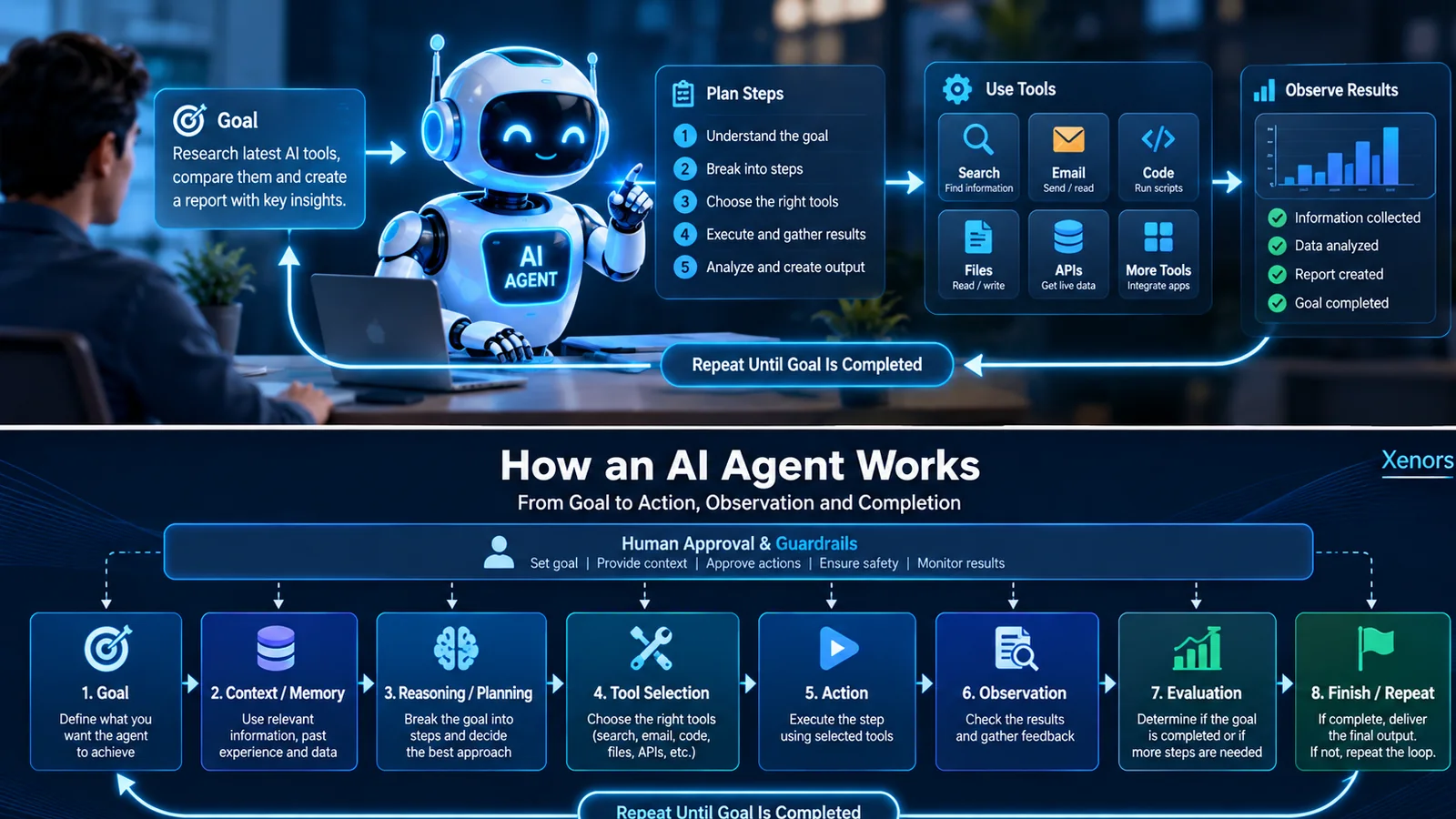
Quick answer: what are AI agents?
AI agents are software systems that take a goal, decide what to do next, use tools or data to take action, observe what happened, and continue until the goal is completed or human input is required. In simple terms, a chatbot mainly answers; an agent can also do. Modern agents often combine a language model with instructions, tools, memory or context, an action loop, safety rules and evaluation.
What are AI agents in simple terms?
An AI agent is best understood as a goal-driven software worker. You give it an objective such as “research five CRM tools, compare prices and create a short recommendation.” A normal chatbot might explain how to do that. An AI agent can be designed to search, read product pages, collect data, compare results, create a document and stop when the required output is ready.
The important idea is not “autonomy at any cost.” Good agents operate inside clear boundaries. They should know what they are allowed to do, what requires approval and when to stop. OpenAI describes agents as AI systems with instructions, guardrails and access to tools that can take action on a user’s behalf. Google Cloud similarly emphasizes reasoning, planning, memory and a degree of autonomy. Anthropic makes a useful distinction between fixed workflows and agents that dynamically choose their next action.
That is why the phrase “what are AI agents and how to create them” is really two questions. First, what makes a system an agent instead of a chatbot? Second, how do you combine the parts so it reliably finishes real work?
What are AI agents and how do they work?
Most modern AI agents follow a repeated loop rather than producing one final answer immediately. The exact implementation varies, but the underlying pattern is remarkably consistent:
- Goal: the user or system defines the desired outcome.
- Context: the agent receives relevant instructions, data, history and constraints.
- Reasoning and planning: the model decides the next useful step.
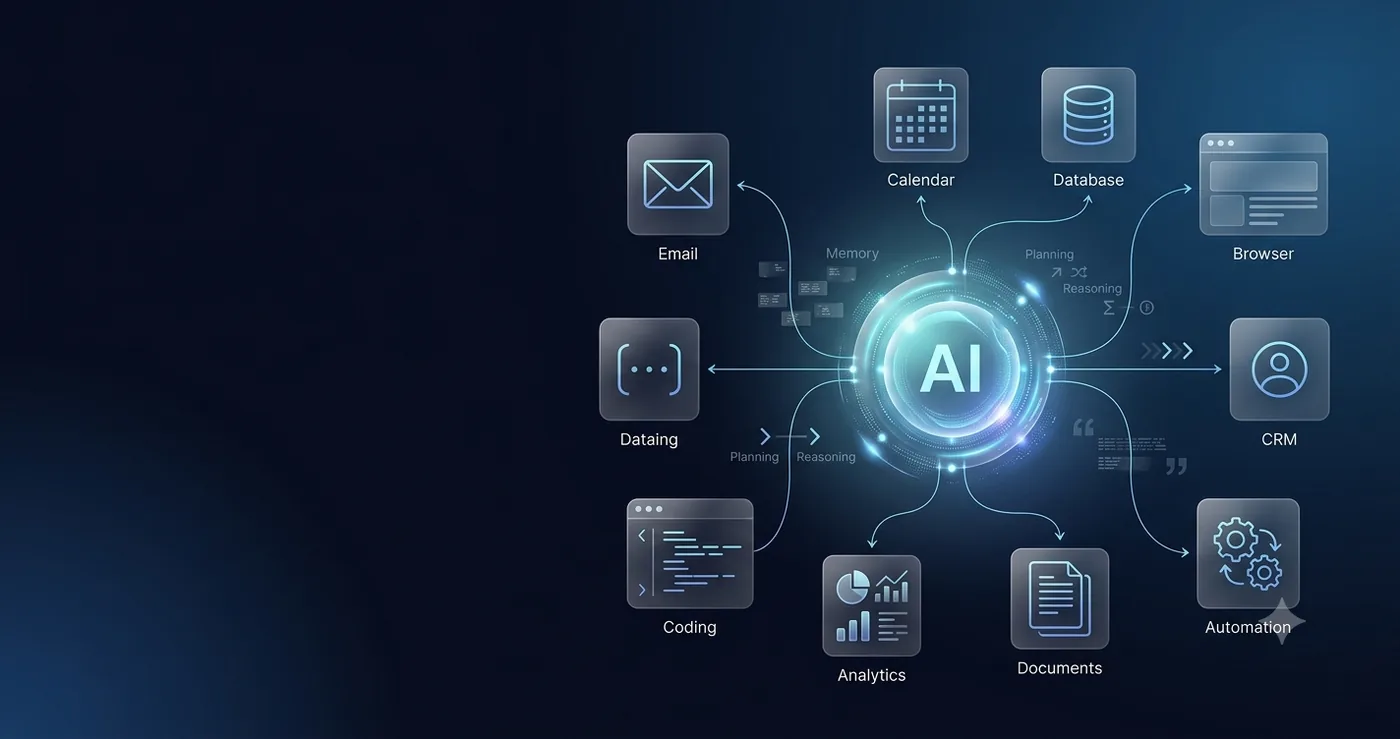
- Tool selection: it chooses a search tool, API, database, file reader, browser, code runner or another capability.
- Action: the tool executes the step.
- Observation: the agent inspects the tool result.
- Evaluation: it decides whether the goal is complete, failed or needs another step.
- Finish or repeat: it returns a result or continues the loop.
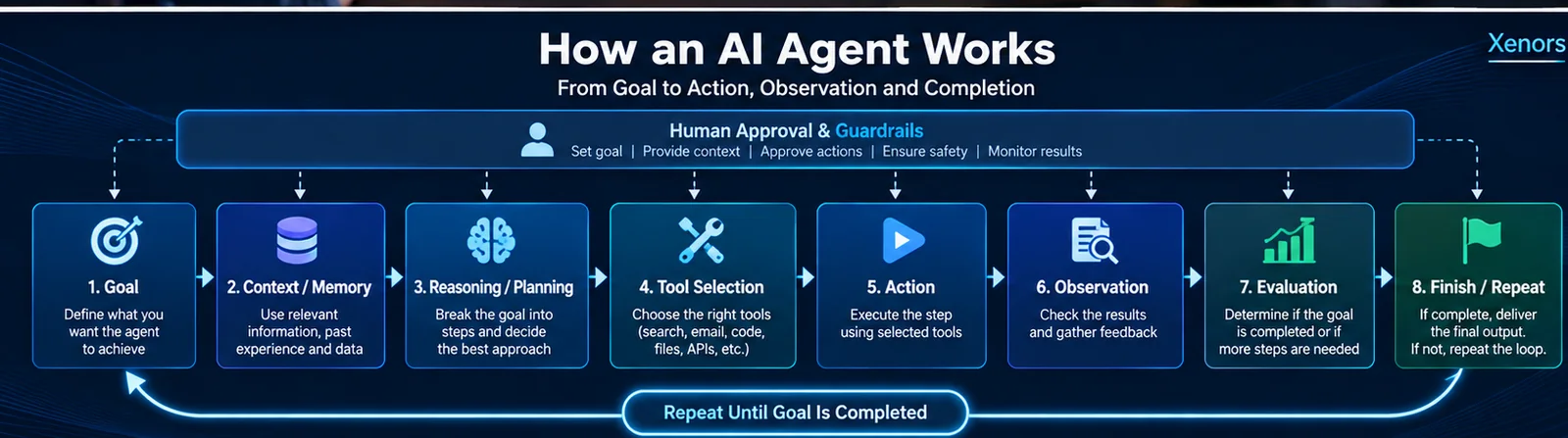
This loop is the part many beginner explanations miss. An agent is not simply “an AI model connected to an API.” The agent needs a control mechanism that decides what happens after every action and prevents endless or unsafe behavior.
The 8 core components of an AI agent
1. A goal
Every agent needs a clear definition of success. “Help with marketing” is vague. “Find ten relevant publications, collect contact details, score fit, and draft outreach for human approval” is measurable.
2. Instructions
Instructions define behavior: what the agent should optimize for, what data it can use, which actions need approval, the tone of outputs and the conditions under which it should stop.
3. A model
The model handles interpretation, reasoning and decision-making. Bigger is not automatically better. A smaller model may be enough for routing or extraction, while a more capable model may be justified for complex planning.
4. Tools
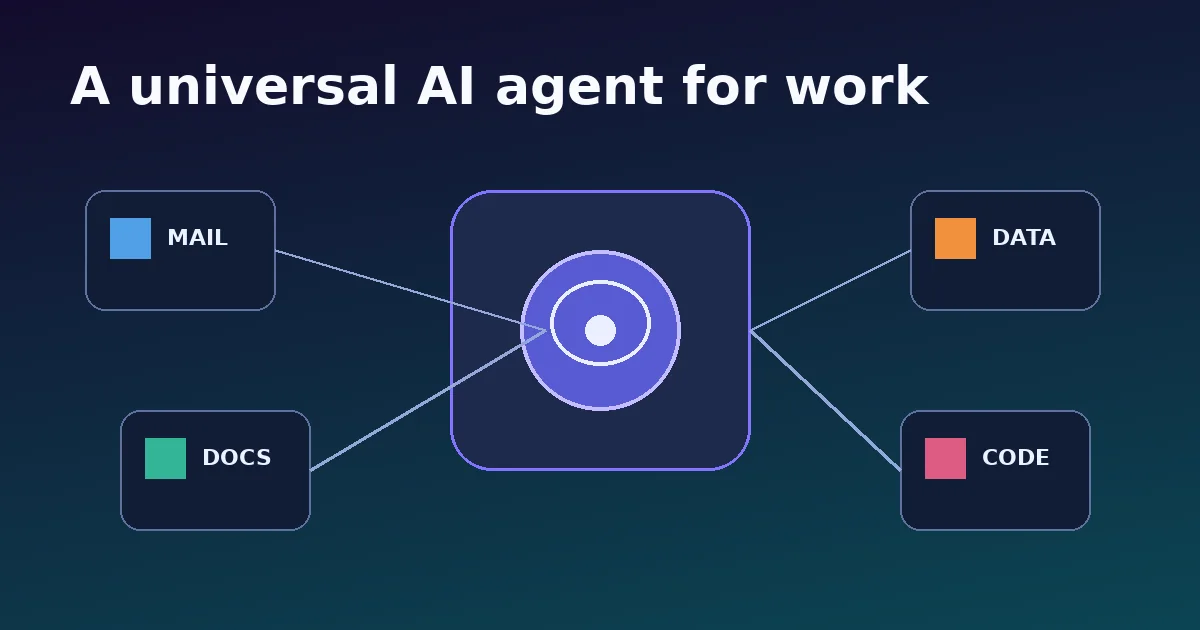
Tools let the agent act. Examples include web search, file search, email, calendar, databases, CRM systems, payment APIs, code execution, browsers and internal business software.
5. Context and memory
Context is the information available now. Memory is information retained across steps or sessions. Good systems distinguish between short-term task state and long-term user or business knowledge.
6. The agent loop
The loop turns isolated model calls into a system that can pursue a goal over multiple steps. It also needs limits: maximum steps, timeouts, budgets and explicit termination conditions.
7. Guardrails
Guardrails constrain inputs, outputs and actions. They are especially important when tools can send messages, change records, make purchases or access sensitive data.
8. Evaluation and observability
You need traces, logs, test cases and metrics to know why an agent succeeded or failed. Without observability, “it usually works” is not a production strategy.
What are AI agents used for? Real examples
AI agents are most useful when a task has several steps, requires decisions between steps and benefits from access to tools. Common examples include:
| Use case | What the agent can do | Where humans should stay involved |
|---|---|---|
| Customer support | Read a ticket, check account context, search policy, draft a response, update the ticket. | Escalations, refunds, sensitive cases. |
| Research | Search sources, extract facts, compare evidence and build a cited brief. | Final judgment and high-stakes claims. |
| Software development | Inspect code, propose changes, run tests, fix failures and prepare a patch. | Architecture decisions and production deployment. |
| Sales operations | Research prospects, enrich data, score fit and draft personalized outreach. | Approval before sending and compliance. |
| Data analysis | Load data, write queries, create charts, explain anomalies and iterate. | Business interpretation and sensitive decisions. |
| Personal productivity | Summarize email, prepare meetings, draft documents and organize tasks. | Actions that communicate or commit externally. |
AI agent definition, examples and types
There is no single universal taxonomy, but these categories are useful in practice:
- Tool-using agents: one model chooses from a controlled set of tools.
- Workflow agents: some steps are fixed while the model makes decisions inside selected stages.
- Single autonomous agents: one agent plans and iterates through an open-ended task within limits.
- Multi-agent systems: multiple specialized agents collaborate or hand work to each other.
- Computer-use agents: the agent interacts with graphical interfaces such as a browser or desktop.
- Background agents: systems that run on triggers or schedules and surface a result when conditions are met.
For most real applications, start with the least autonomous architecture that can reliably finish the task. Complexity should earn its place.
AI agent vs chatbot vs automation
| System | Main behavior | Chooses next step? | Uses tools? | Best for |
|---|---|---|---|---|
| Chatbot | Responds to prompts | Usually limited | Sometimes | Q&A, drafting, support conversations |
| Traditional automation | Follows predefined rules | No | Yes | Stable repetitive processes |
| AI workflow | Fixed process with AI decisions inside it | Partly | Yes | Controlled multi-step business flows |
| AI agent | Pursues a goal and adapts next steps | Yes | Usually | Dynamic tasks with changing paths |
When should you build an AI agent?
Build an agent when the workflow has enough uncertainty that fixed automation becomes brittle. Good candidates usually have several of these properties:
- The task needs multiple steps.
- The next step depends on what happened in the previous step.
- Useful context is spread across files, databases or applications.
- The task benefits from natural-language reasoning.
- There is a meaningful action to take, not just a text response.
- You can define success and acceptable failure.
How to create an AI agent step by step
If your real query is “what are AI agents and how to create them?”, this is the section to follow. The safest path is to build one narrow, observable agent first and add capability only when evidence shows you need it.
Step 1: choose one specific job
Do not begin with “build a general business agent.” Start with something testable: “Read a support ticket, retrieve the correct policy, draft a response and ask for approval before sending.”
Step 2: write the success criteria
Define what a correct output looks like, what must never happen and when the agent should escalate. Your test cases will come from these criteria.
Step 3: define instructions and boundaries
Tell the agent its role, goal, operating rules, priorities and stop condition. Include what to do when information is missing rather than letting it guess.
Step 4: connect the minimum tools
Give the agent only the tools needed for the job. If the task requires policy lookup and ticket updates, it may only need search, ticket read and ticket write. Every extra tool increases failure surface.
Step 5: add context and memory intentionally
Decide what state belongs in the current run, what should persist and what should never be stored. Long-term memory should be selective, permission-aware and auditable.
Step 6: add approvals for risky actions
Use human confirmation before sending messages, spending money, deleting data, modifying important records or performing other irreversible actions.
Step 7: add limits and recovery
Set maximum tool calls, execution time, budget and retries. Define what happens when a tool fails or returns contradictory information.
Step 8: test with realistic edge cases
Do not test only happy paths. Include ambiguous requests, unavailable tools, incomplete data, malicious instructions, conflicting sources and partial failures.
Step 9: measure quality before adding more agents
Track completion rate, correctness, human correction rate, tool failures, latency and cost. Multi-agent orchestration should solve a demonstrated problem, not decorate the architecture.
How to build an AI agent in Python
One current code-first route is OpenAI's Agents SDK. The basic development pattern is: install the SDK, define one focused agent, run it, then add tools and specialist agents only as needed.
# Install first:
# pip install openai-agents

import asyncio
from agents import Agent, Runner

agent = Agent(
    name="Research assistant",
    instructions=(
        "Answer clearly. If information is missing, say what is missing. "
        "Do not claim a task is complete until the goal is satisfied."
    ),
    model="gpt-6-astra",
)

async def main():
    result = await Runner.run(
        agent,
        "Explain the difference between an AI agent and a chatbot."
    )
    print(result.final_output)

if __name__ == "__main__":
    asyncio.run(main())
This example is intentionally small. A useful agent becomes more agent-like when you add approved tools, task state, guardrails and an evaluation loop. Start simple, inspect traces, then extend.
A production-ready AI agent architecture
A production system usually needs more than the model and a tool list. A practical architecture may include:
- API or UI layer for user requests and approvals.
- Agent runtime that manages turns, tools, state and stop conditions.
- Tool layer with strict schemas, authentication and permissions.
- Context layer for retrieval from documents, databases or knowledge stores.
- Policy layer for safety, compliance and allowed actions.
- Observability for traces, tool calls, latency, cost and failure analysis.
- Evaluation suite for regression tests before releases.
- Human approval for high-impact actions.
The most important architectural decision is where autonomy ends. Some tasks should be fully automatic. Others should pause for approval. High-stakes workflows may need multiple validation layers before any action is executed.
AI agent guardrails and security
Agents become more useful as they gain access to tools, but the same access increases risk. A document-reading agent can encounter prompt injection. An email agent can send the wrong message. A browser agent can click the wrong control. A database agent can modify data. Safety must be part of the architecture, not a final prompt.
- Use least-privilege tool permissions.
- Separate read tools from write tools.
- Require approval for high-impact actions.
- Validate tool arguments with strict schemas.
- Treat retrieved web and document content as untrusted input.
- Do not expose secrets in prompts or tool outputs.
- Log actions with enough detail for audit and debugging.
- Set time, step and spending limits.
- Design safe failure behavior when context is uncertain.
How to test whether your AI agent actually works
A good demo is not the same as a reliable agent. Build a small evaluation set that represents real tasks and failure modes. For every test, define what success means.
| Metric | Question it answers |
|---|---|
| Task completion rate | Did the agent actually finish the requested job? |
| Correctness | Was the result factually and procedurally correct? |
| Tool accuracy | Did it choose the right tool with valid arguments? |
| Human correction rate | How often did a person need to fix the result? |
| Latency | How long did successful runs take? |
| Cost per completed task | What does a useful result actually cost? |
| Safety failure rate | Did it attempt actions that should have been blocked? |
Common AI agent mistakes
Using an agent where a workflow would be better
If the sequence never changes, deterministic automation is often more reliable.
Giving the agent too many tools
More tools increase choice complexity and security risk. Start with the minimum set.
Using vague instructions
“Be helpful” is not an operating policy. Define success, failure, escalation and constraints.
No explicit stop condition
Agents need boundaries: maximum steps, maximum retries and a clear definition of done.
No evaluation set
If you do not know how to measure quality, you cannot safely improve the system.
Jumping directly to multi-agent architecture
Specialists and handoffs can help, but they also add latency, cost and debugging complexity. Prove the need first.
What are AI agents and how to use them effectively?
For end users, the best results usually come from giving an agent a goal, enough context, clear constraints and a definition of what “done” means. Instead of “research laptops,” try “compare five lightweight laptops under my budget, prioritize battery life, use current sources, show trade-offs, and do not purchase anything without asking me.”
That prompt is better because it gives the system an objective, decision criteria, boundaries and a human-approval rule. The same principle applies when developers design agents in code.
Frequently asked questions about AI agents
What are AI agents and how do they work?
AI agents are goal-driven software systems. They interpret a goal, gather context, decide a next step, use a tool or take an action, inspect the result and repeat until they finish or need human input.
What are AI agents and examples?
Examples include research agents, coding agents, customer-support agents, sales agents, data-analysis agents and computer-use agents. The defining feature is not the industry; it is the ability to pursue a goal through multiple actions.
What are AI agents used for?
They are used for multi-step tasks such as research, support, coding, analysis, document processing, workflow automation, monitoring and operations.
What are AI agents and how to build them?
Start with one measurable goal, give the agent precise instructions, connect only necessary tools, add context and state, define guardrails and stop conditions, then test realistic cases before expanding the system.
Can I create an AI agent without coding?
Yes. Visual workflow and agent-building tools can create useful agents without code. Code becomes valuable when you need custom tools, strict integrations, versioning, testing or production deployment.
Do AI agents learn automatically?
Not necessarily. An agent can adapt within a task by observing results without permanently retraining its model. Long-term improvement usually requires explicit memory, data updates, prompt changes, tool changes or model training.
Are AI agents the same as agentic AI?
They overlap but are not identical. An AI agent is a software system or component. Agentic AI is a broader description of systems that can pursue goals, plan, act and adapt with a meaningful degree of autonomy.
Final takeaway
If you remember only one idea, remember this: an AI agent is not just an AI model—it is a controlled system that can decide and act toward a goal. The most reliable way to create one is to start with a narrow task, connect a small number of trusted tools, keep humans involved where actions matter, measure quality and expand only after the simple version works.
Related Xenors guides
Sources and further reading
This guide was researched against current primary and high-authority material, including OpenAI's agent-building guides and Agents SDK documentation, Anthropic's guidance on effective agent architectures, Google Cloud's AI-agent overview and Meta's 2026 guide to agentic AI. Product interfaces and SDKs can change, so developers should verify implementation details against current official documentation before production deployment.